
"Table structure cannot read or update" in the warehouse catalog error while updating a table structure in Microstrategy

"Table structure cannot read or update"

 in the warehouse catalog error while updating a table structure whileusing Warehouse Catalog in MicroStrategy Developer 
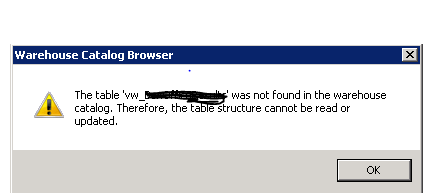


This issue could be due to the incorrect prefix. 

To fix the issue.
1. Open the Warehouse Catalog.
2. Select the table and assign the correct Prefix update the structure.
3. Save and close the warehouse catalog.

Comments

Popular posts from this blog

Case functions Microstrategy

Ca se functions Microstrategy Case functions return specified data in a SQL query based on the evaluation of user-defined conditions. In general, a user specifies a list of conditions and corresponding return values. Case This function evaluates multiple expressions until a condition is determined to be true, then returns a corresponding value. If all conditions are false, a default value is returned.  Case  can be used for categorizing data based on multiple conditions. This is a single-value function. Syntax Case ( Condition1 ,  ReturnValue1 ,  Condition2 , ReturnValue2 ,...,  DefaultValue ) Example Case(([Total Revenue] < 300000), 0, ([Total Revenue] < 600000), 1, 2) sum(Case (Day@DESC in (“Sat”,”Sun”), Sales, 0) {~+} Sum(Case(Category@DESC In("Books","Electronics"),Revenue,0)){~+} CaseV (case vector) CaseV  evaluates a single metric and returns different values according to the results. It can be used to perfo...

Microstrategy Dossiers explained

Microstrategy  Dossiers With the release of MicroStrategy 10.9, we’ve taken a leap forward in our dashboarding capabilities by simplifying the user experience, adding storytelling, and collaboration.MSTR has  evolved dashboards to the point that they are more than dashboards - they are  interactive, collaborative analytic stories . Ultimately, it was time to go beyond dashboards, both in concept and in name, and so  the've  renamed VI dashboards to  ‘ dossiers ’.  Dossiers can be created by using the new Desktop product or Workstation or simply from the Web interface which replaces Visual Insights. All the existing visual Insights dashboards will be converted to Dossiers   With MicroStrategy 10.9, there was an active focus on making it easier to build dashboards for the widest audience of end users. To achieve this, some key new capabilities were added that make it easier to author, read, interact and collaborate on dashboards ...

The logical table size calculation in Microstrategy

The logical table size calculation in Microstrategy The logical table size is an integer number that represents the granularity or level of aggregation of a particular table. It is called 'logical' because it is not related to the physical size of the tables (number of rows). It is calculated according to the attribute IDs that are present in the table and their level in the system hierarchy.   Even though, the number does not reveal the actual number of rows in the table, it is an accurate way of measuring a table size without having to access its contents.   MicroStrategy Engine utilizes an algorithm based on attribute keys to calculate the Logical Table Size (LTS):   Given the following tables:     The algorithm that calculates the table sizes performs the following steps: Calculate the number of levels per hierarchy: Hierarchy 1: 3 Hierarchy 2: 4 Calculate each attribute individual weight according to the level in the hierarchy (level in hierarchy/number of ...

Types of prompts in Microstrategy

Types of prompts in Microstrategy The different types of prompts allow you to create a  prompt  for nearly every part of a report. Prompts can be used in many objects including reports, filters, metrics, and custom groups, but all prompts require user interaction when the report is executed. The correct prompt type to create depends on what report objects you want users to be able to base a filter on to filter data, as described in the list below. Filter definition prompts   allow users to determine how the report's data is filtered, based on one of the following objects: Attributes in a hierarchy : Users can select prompt answers from one or more attribute elements from one or more attributes. The attribute elements that they select are used to filter data displayed on the report. This prompt lets you give users the largest number of attribute elements to choose from when they answer the prompt to define their filtering criteria. For example, on a repor...

RunningSum calculation only on the metric subtotal in MicroStrategy

RunningSum calculation only on the metric subtotal in MicroStrategy Here are the series of steps to setup report objects in which metrics and subtotals so only the  subtotal field  will contain the  RunningSum  and the  regular metric values  will be  standard sum values . 1) Create Metric 1 which is the sum of the fact that is to be in the columns. 2) Create Metric2 as the RunningSum of Metric1.  NOTE:  The  sortby  parameter for the RunningSum should be set to whichever attribute you want the report sorted by. 3) Create Metric3 as Metric1 + (Metric2 x 0) 4) Create a new subtotal called "Max" which is defined as Max() 5) On the Subtotals/Aggregation tab for Metric 3, set the Total subtotal function to be "Max" and select the check box for "Allow Smart Metric" 6) Create the desired report and place the 3 metrics on the report.  NOTE:  Only Metric3 is required on the gri...

MicroStrategy URL API Parameters

MicroStrategy URL Structure The following table summarizes the root URL structure used for every request to MicroStrategy Web. Environment Main Application URL Administration URL J2EE http://webserver/MicroStrategy/servlet/mstrWeb http://webserver/MicroStrategy/servlet/mstrWebAdmin .NET http://webserver/MicroStrategy/asp/Main.aspx http://webserver/MicroStrategy/asp/Admin.aspx Every request sent to MicroStrategy Web calls a central controller. Parameters are appended to  Main.aspx  or  mstrWeb  (in a .NET and J2EE environment, respectively) to indicate to the controller how the request should be internally forwarded and handled. The following examples show a URL for accessing a MicroStrategy folder when the user does not have an existing session. The URL contains not only the parameters needed to connect to MicroStrategy Web, but also the parameters needed to log on and create a session. J2EE environment: <a href="http:...

Email Subscription in Microstrategy

Create Email Subscription in Microstrategy Creates an email subscription. Do not include any leading or trailing spaces in the ANSWER parameters. This causes a SQL error and prevents the command from executing. Ex: CREATE EMAILSUBSCRIPTION "New Multi Users" FOR OWNER "administrator" SCHEDULE "Books Closed" CONTACTGROUP "TEST"  CONTENT "Electronics Revenue by Region" IN FOLDER "\Public Objects\REPORTS\SUBJECT Areas\Sales and Profitability Analysis" IN PROJECT "MicroStrategy Tutorial" DELIVERYFORMAT HTML  EXPIRATIONDATE NEVER EXPRIED FILENAME "file_name"   SUBJECT  "Test REPORT" MESSAGE "Please Test"; CREATE EMAILSUBSCRIPTION [ subscription_name ] [FOR OWNER login_name ] SCHEDULE schedule_name  (ADDRESS address_name | USER user_name  | CONTACT contact_name [ADDRESS contact_ address_name ] | CONTACTGROUP contact_group_name ) CONTENT ( report_or_document_name IN FOLDER   loc...

Optimizing queries in Microstrategy using VLDB properties

Optimizing queries in  Microstrategy using VLDB properties #vldb #vldbproperties The table b elow summarizes the Query Optimizations VLDB properties. Additional details about each property, including examples where necessary, are provided in the sections following the table. Property Description Possible Values Default Value Additional Final Pass Option Determines whether the Engine calculates...

Components of the MicroStrategy Engine

Components of the MicroStrategy Engine The MicroStrategy Engine consists of three engines:  • SQL Engine  • Query Engine  • Analytical Engine  These individual engines work together to fulfill report requests submitted by MicroStrategy that can be resolved by pure SQL alone.  The SQL Engine is responsible for generating optimized SQL and producing result sets that can be resolved by pure SQL alone. The Query Engine is responsible for executing the SQL generated by the SQL Engine.  The Analytical Engine is responsible for performing any calculation that cannot be resolved with SQL alone.

Apply or Pass-through functions in Microstrategy

Ap ply (Pass-Through) functions MSTR Apply functions provide access to functions or syntactic constructs that are not standard in MicroStrategy but are provided by various RDBMS systems.. Syntax common to Apply functions Apply Function Name   ("expression with placeholders", Arg1, Arg2, Arg3, …ArgN) where: Apply Function Name  – is a generic name used for the predefined pass-through functions described above expression with placeholders  – is the string describing the actual expression or syntax that the engine uses while generating the SQL and which is sent to the RDBMS. The placeholders are represented by #0, #1, and so on. "#" is a reserved character for MicroStrategy. Arg  – is an argument that replaces the parameter markers in the pattern. Arg1 replaces #0, Arg2 replaces #1, and so on. There are   five  pre-defined Apply functions to replace regular, predefined functions of the same type. For more details, cli...