HyperIntelligence and its Architecture

HyperIntelligence and its Architecture

When you open a web page the extension automatically scans web pages in your browser and underlines keywords that you can hover over to trigger cards. Cards present predefined KPIs associated with a selected keyword sourced securely from MicroStrategy.

This feature is similar to what we see in web pages particularly stock related web sites. 
MicroStrategy introduced HyperCards, a new object that is built, managed, and deployed using MicroStrategy Workstation(Not by using Developer or Desktop as far as I know). Cards can be consumed in a web browser via the MicroStrategy HyperIntelligence Chrome extension and on iOS devices via the MicroStrategy HyperMobile app. This feature can help the users to inject Zero-Click Intelligence (as it requires the users to hover only and no need to click!) about customers, products, people, and more directly onto words within websites or web application or emails. This feature can display the content through the mobile devices to bring answers through relevant, context-based analytics.
HyperIntelligence assists the users to find a report without logging into the environment and then allows to locate relevant information. It brings answers directly to you through contextualized text analytics that is as simple as hovering over a highlighted word.
HyperIntelligence can be an interesting and exciting feature for all levels of report/analytics users as they can see the reports as they type on in emails as below:

Salient features of HyperIntelligence:
  • Enables the text analytics that is as simple as hovering over a highlighted word in your email or web browser.
  • HyperIntelligence automatically scans every web page and underlines relevant keywords. Hover over a highlighted word to see insights in real-time.
  • Each card can seamlessly combine information from multiple enterprise assets and applications.
  • The extension supports multiple cards for different use cases. Each card can point to a different keyword. Simply click the extension icon to see the list of available cards or toggle individual cards on or off.
  • By default, the extension will work with any web-based content, however it is possible to blacklist individual websites - disabling the extension's functionality.
Microstrategy 2019 enhances the HypeIntelligence features further by introducing vision voice screen etc with the the new features like Hypevoice, Hyperscreen and Hypervision.

Hypervoice:

This feature allows the users to ask questions to get instant answers through voice commands in a similar fashion as you interact with Alexa. MicroStrategy integration with Amazon Alexa or Google Home (Not sure about Apple Homepod integration) to turn analytics applications into a voice-enabled personal coach. Which could boost productivity by blending insights into existing workflows. Developers can leverage MSTR APIs to integrate with voice-controlled applications like Amazon Alexa and Google Home. With MSTR-developed NLG and voice recognition mechanisms, it could be easy to get answers to the business questions on the way to the next meeting. By integrating with voice technology or chatbots, it’s easy to deliver the right data, fast.
No alt text provided for this image

Hyperscreen:

Hyperscreen enables the personalized insights on every wall(screen) you walk through. It can turn a screen into a dynamic, intelligent display that presents a personalized view of information based on who is standing nearby. It uses the new feature called Digital Identity to transform offices and facilities into spaces that inspire data-driven collaboration and action.

Hypervision:

Here, the magic comes by embedding analytics with virtual reality. Hold up your device for an augmented reality experience that overlays insights on objects and surroundings. Use image recognition to scan products and check inventory, or use GPS location to get an instant customer brief as you walk into your meeting.

Architecture 

The above workflow can be described as:


  • HypeIntelligence extension from Google Chrome browser submits a REST API request to MicroStrategy cubes by requesting topic(attributes!) and metrics.Data received from MSTR cubes to the browser is cached.
  • When the user open the browser and opens a web page or types text in emails or open emails. 
  • The extension finds matches and highlights those matching keywords.
  • Users hovers the highlighted keyword.
  • Extension displays the hypercard as designed.
  • Once the extension gets the data it caches the data and display the data in Hypercards whenever a user hovers on the key word highlighted.
 Deliver Zero-Click Intelligence
 Combine Information from Multiple Systems
 Support Multiple Cards
 Blacklist Individual Websites

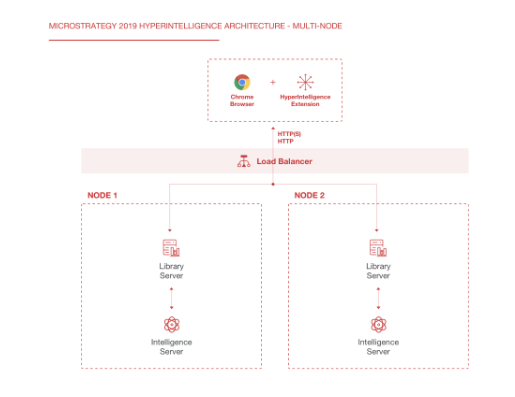
The architecture for HyperIntelligence is similar to MicroStrategy Library. MicroStrategy Library is a client application running on a desktop browser or a mobile device, whereas HyperIntelligence is currently only available as a Chrome browser extension
If we compare this architecture with the old Microstratgey architecture we see the additional component of MicroStrategy Library which makes all the magic of HyperIntelligence.
 Single node architecture

Multi Node Architecture:

Comparison between Single node i-server and multi node i-server:

HyperIntelligence Workflow 

Hover effects won’t work on mobile devices because there’s no mouse cursor. To overcome this MSTR has handled mobile links with high color and shape contrast on them so that user will know where to tap. So that it displays the cards.
I have not yet explored this feature when the email goes to external users and the data level security(security filters) work as we are not passing any security filters.Handling of row level security on the cards is still a mystery!

Comments

Post a Comment

Popular posts from this blog

Microstrategy Custom number formatting symbols

Custom number formatting symbols If none of the built-in number formats meet your needs, you can create your own custom format in the Number tab of the Format Cells dialog box. Select  Custom  as the Category and create the format using the number format symbols listed in the table below. Each custom format can have up to four optional sections, one each for: Positive numbers Negative numbers Zeros Text Each section is optional. Separate the sections by semicolons, as shown in the example below: #,###;(#,###);0;"Error: Entry must be numeric" For more examples, see  Custom number formatting examples . To jump to a section of the formatting symbol table, click one of the following: Numeric symbols Character/text symbols Date and time symbols Text color symbols Currency symbols Conditional symbols Numeric symbols For details on how numeric symbols apply to the Big Decimal data type, refer to the  Project Design Guide . ...

MicroStrategy URL API Parameters

MicroStrategy URL Structure The following table summarizes the root URL structure used for every request to MicroStrategy Web. Environment Main Application URL Administration URL J2EE http://webserver/MicroStrategy/servlet/mstrWeb http://webserver/MicroStrategy/servlet/mstrWebAdmin .NET http://webserver/MicroStrategy/asp/Main.aspx http://webserver/MicroStrategy/asp/Admin.aspx Every request sent to MicroStrategy Web calls a central controller. Parameters are appended to  Main.aspx  or  mstrWeb  (in a .NET and J2EE environment, respectively) to indicate to the controller how the request should be internally forwarded and handled. The following examples show a URL for accessing a MicroStrategy folder when the user does not have an existing session. The URL contains not only the parameters needed to connect to MicroStrategy Web, but also the parameters needed to log on and create a session. J2EE environment: <a href="http:...
Microstrategy Release Types Platform release Interval:  Annually every twelve (12) months in December Who:  Entire customer base What:  Focus on production level security, stability, and performance defect fixes for all customers. Expectation:  Customer has chosen platform path and wants product stability without new enhancements. Support:  Three (3) years, patches for approved P1 defects, and regular hotfix cadence addresses critical defects. Feature Release Interval:  Quarterly every three (3) months Who:  Customers with specific feature requirements. What:  New functionality developed in close collaboration with customers and customer council. Expectation:  Customer has chosen feature path, will consume further feature releases. Support:  Six (6) months patch support for approved P1 defects and (eighteen) 18 months troubleshooting. Customers upgrade to next feature release for roll-up f...

Email Subscription in Microstrategy

Create Email Subscription in Microstrategy Creates an email subscription. Do not include any leading or trailing spaces in the ANSWER parameters. This causes a SQL error and prevents the command from executing. Ex: CREATE EMAILSUBSCRIPTION "New Multi Users" FOR OWNER "administrator" SCHEDULE "Books Closed" CONTACTGROUP "TEST"  CONTENT "Electronics Revenue by Region" IN FOLDER "\Public Objects\REPORTS\SUBJECT Areas\Sales and Profitability Analysis" IN PROJECT "MicroStrategy Tutorial" DELIVERYFORMAT HTML  EXPIRATIONDATE NEVER EXPRIED FILENAME "file_name"   SUBJECT  "Test REPORT" MESSAGE "Please Test"; CREATE EMAILSUBSCRIPTION [ subscription_name ] [FOR OWNER login_name ] SCHEDULE schedule_name  (ADDRESS address_name | USER user_name  | CONTACT contact_name [ADDRESS contact_ address_name ] | CONTACTGROUP contact_group_name ) CONTENT ( report_or_document_name IN FOLDER   loc...

"Table structure cannot read or update" in the warehouse catalog error while updating a table structure in Microstrategy

"Table structure cannot read or update"  in the warehouse catalog error while updating a table structure while using Warehouse Catalog in MicroStrategy Developer  This issue could be due to the incorrect prefix.  To fix the issue. 1. Open the Warehouse Catalog. 2. Select the table and assign the correct Prefix update the structure. 3. Save and close the warehouse catalog.

Microstrategy Document Autotext macros:

Autotext  code/macros in  Microstrategy Document/dashboard This is a list of the available auto text macros that the Report Services Document engine recognizes. The following auto text codes allow you to add  document variable information to your document. These auto text codes are automatically replaced by information about the document. Auto text codes for MSTR document/dashboard:  AUTOTEXT DESCRIPTION   {&PAGE}  Display the current page.  {&NPAGES}  Display the total number of pages.  {&DATETIME}  Display the current date and time.  {&USER}  Display the user name that is executing the Report Services Document.  {&DOCUMENT}  Display the document name.  {&DOCUMENTID}  Display the document ID.  {&DESCRIPTION}  Display the document description.  {&PROJECT}  Display the project name.  {&EXECUTIONTIME}  Dis...

Prompt-in-prompt(Nested Prompts) in Microstrategy

Prompt-in-prompt(Nested Prompts) in  Microstrategy Nested prompts allows you to create one prompt based on the other and other bases on another, nested prompts allows us to prompt the highest level(Like year) to middle level(like Quarter, then to the low level(like Month). Here you can see how to  create a 3-level deep nested prompt that will prompt the user to select a year, then a quarter within that year, then a month within that quarter. Prompt-in-prompt is a feature in which the answer to one prompt is used to define another prompt. This feature is only implemented for element list prompts . The following procedure describes how to achieve this: Create the highest level filter. This is a filter which contains a prompt on an attribute element list. Create a filter on the attribute "Year." Click "prompt on attribute element list" and click "Next" through the rest of the screens to accept the default values. Do not set any additio...

Internationalization Design Technics

Microstrategy Internationalization Design Technics MicroStrategy supports data internationalization through two different techniques. You can either provide translated data through the use of extra tables and columns, or you can provide separate databases to store your translated data. These techniques are described below: You can support data internationalization in your database by using separate tables and columns to store your translated data. You can use various combinations of tables and columns to support and identify the translated data in your database. To support displaying the name of each month in multiple languages, you can include the translated names in a separate column, one for each required language, within the same table. Each column can use a suffix to identify that the column contains translated data for a certain language. The same LU_MONTH_OF_YEAR table with translated data for the Spanish and German langua...

Personalizing file locations, email and file subscriptions using macros in Microstrategy

Personalizing file locations MSTr allows to dynamically specify the  File Location  and  Backup File Location  in a file device using macros.  For example, if you specify the  File Location  as  C:\Reports\{&RecipientName}\ ,  all subscriptions using that file device are delivered to subfolders of  C:\Reports\ . Subscribed reports or documents for each recipient are delivered to a subfolder with that recipient’s name, such as  C:\Reports\Jane Smith\  or  C:\Reports\Hiro Protagonist\ . The table below lists the macros that can be used in the  File Location  and  Backup File Location  fields in a file device: Description Macro Date on which the subscription is sent {&Date} Time at which the subscription is sent {&Time} Name of the recipient {&RecipientName} User ID (32-character GUID) of the recipient {&RecipientID} Distribution Services add...

Activate MicroStrategy Geospatial Services

Activate MicroStrategy Geospatial Services MicroStrategy 10.11 introduces our new mapping capability: MicroStrategy Geospatial Services, powered by Mapbox. This enhanced map visualization is available for dossiers on all interfaces including MicroStrategy Desktop, Workstation, Web and Library (Mobile included). With MicroStrategy Geospatial Services, MicroStrategy now offers advanced geospatial analytics features that allow users to get more out of their location data. This new feature is available in addition to the out-of-the-box ESRI maps. MicroStrategy Geospatial Services allows users to: Plot polygon shapes for most countries, down to the zip code level Perform powerful interaction between layers (progressively hide or show data layers as zoom levels change) Identify and resolve location name conflicts Add thresholds to data points, size markers for metrics, and color by for both attributes and metrics Fine tune clustering behavior when aggregating data on a ma...